So GeoCities is no more.
When I first got access to the web (around 1995), you used to bump into GeoCities sites all over the place. I would look at my web browser (good old Netscape), and wonder what to go looking for. "How about my favourite bands?" And at the other side of the web there was some adolescent setting up their GeoCities web site, wondering what to put onto their home page. "How about a list of my all my CDs? Yes, that will be interesting." In the days before Google and relevant web searches, Lycos or Alta Vista would happily bring up such sites in response to a query for Genesis or Pink Floyd.
Web sites like that are now either long gone, or on page 945 of my Google results and so, effectively, equally non-existent. Lycos is still around (much to my surprise--what market share can they have?), but nowadays puts the Pink Floyd official web site at the top of its search results.
Saturday, 31 October 2009


Tuesday, 29 September 2009
CLCL
I can't remember where I found out about Nakashima Tomoaki's CLCL, but I do remember that I was sufficiently taken by the idea of a program that remembers a list of everything I copy onto the clipboard, whether it be snippets of text or whole files, that I downloaded and installed it straight away, and I've been using it every day since. A few months later I was able to get it set up to act as a quick launcher too, and I use that every day as well.
Despite being so useful, some of the installation instructions took me a while to work out (which explains the few months gap I just mentioned), so I thought I'd lay out here what I did to get this excellent program working.
First, and unsurprisingly, you need to download it. I got my copy at http://www.nakka.com/soft/clcl/index_eng.html. Download clcl112_eng.exe (or one of the other language variants, if they're a better match for you than English). While you're there, also download the two tool plug-ins, tool_text and tool_utl, and the three format plug-ins.
Now run clcl112_eng.exe. It's an installer, and by default unpacks into C:\Program Files\CLCL. You should find you've now got four new files: readme.txt, CLCL.exe, CLCLHook.dll, and CLCLSetup.exe.
CLCL.exe is the clipboard program. It needs to be manually launched, so I put a link to it into my Startup folder under the Start menu. If you run it now, you should notice a paperclip icon appearing in the taskbar. This is a shortcut to CLCLSet.exe.
CLCLSet.exe is a bit confusing. If you double click on the file icon in C:\Program Files\CLCL, it will bring up the CLCL Options dialog. However, if you click on it in the taskbar, you get the CLCL viewer instead. Also, if you right click on the paperclip icon, you get a pop-up menu containing the clipboard history, the Options dialog, and the viewer.
There are endless ways of configuring CLCL, so I will only describe what I've done with it. I find this works flawlessly (for me), so hopefully it will for you too.
Setting up the clipboard history
- Run CLCLSet.exe to get into the Options dialog.
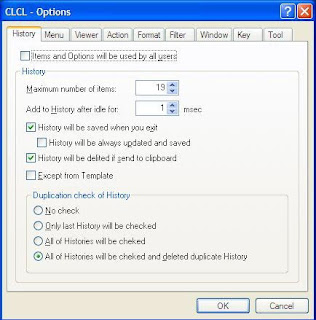
- Choose the Action tab.
- Click on Add...
- Set 'Action' to 'Menu' and 'Call type' to 'Alt + Alt'.
- In the 'Menu' area, click on the line marked '(New content)'. Don't be put off by it being greyed out.
- Now click on the 'Content' dropdown, and select 'History(Ascending)'.
- Hit OK.

You should now find that pressing ALT twice in quick succession will bring up a menu containing a history of everything you've put onto the clipboard since CLCL started running (and this history is retained from session to session).
Setting up the Quick Launcher
- Run CLCLSet.exe to get into the Options dialog.
- Choose the Action tab.
- Click on Add...

- Set 'Action' to 'Menu' and 'Call type' to 'Shift + Shift'.
- In the 'Menu' area, click on the line marked '(New content)'. Don't be put off by it being greyed out.
- Now click on the 'Content' dropdown, and select 'External Application'.
- Fill out 'Title' and 'Path' for an application of your choice; e.g. 'Python 2.5' and 'C:\Python25\python.exe'.
- Pick the executable for 'Icon path' too.
- Hit OK.

You have now added a quick launch for Python 2.5. Pressing Shift twice in quick succession should bring up a menu containing 'Python 2.5'.
Clicking on '(New content)' also allow you to add several other useful features, such as 'Options', 'Cancel', or sub-menus (via 'Pop-up menu').
The CLCL Viewer
I mentioned the CLCL viewer, that comes up when you left click on the paperclip icon in the task bar. The main use I make of this is to edit the contents of the clipboard.
CLCL Tools
Earlier on I said to download two tool plug-ins, tool_text and tool_utl. The tools inside them let you perform a variety of actions on selected text, such as wrapping in quotes, changing case, etc. I will now explain how to install these tools.
The download will give you two zip files. Unzip these and you should find a DLL in each one. There is also the source code and a text file, but these can be ignored. Move the DLLs to a sensible location, such as under C:\Program Files\CLCL.
Now bring up the CLCL options dialog again. Pick the Tools tab. Click on the Browse button and select one of the DLLs. Then select the first tool in the list that appears. Click OK twice to get back to the main dialog.
Repeat this until you have added all the tools in both DLLs. I'm afraid that I have not found a way to import all the tools in a DLL in one go.
To use these tools, go back to the instructions for setting up a quick launcher. Where it asks you to select 'External Application', select 'Tool' instead. In this way you can add the tools to your menus.
CLCL Formats
As well as the tool plug-ins, there were three format plug-ins. These will extend the range of formats available to CLCL, and to install them you have to perform these steps.
Unzip the downloads. Take the DLL in each one and move it to a suitable folder, such as the same one you put the tool DLLs into.
Bring up the CLCL options dialog. Pick the Format tab and click on the Add button. Now click on the Browse button and select one of the DLLs. This will bring up another dialog containing a list with one item in it. Select that item and then press OK twice to get back to the main dialog.
Finally
I hope these instructions prove useful to someone one day. Looking through the options dialog, I realise that there is plenty of stuff I still don't understand. The Window tab in the options dialog is a complete mystery, for instance. If anyone can illuminate that, or any of the other bits I've left out, please let me know and I'll add them to this guide.
Wednesday, 9 September 2009
Milestones for Spotify and this Blog
I've had my first comment, maybe even my first reader, as a result of my last posting on Spotify ads! Seems that if I write about something topical, people might want to read it. Who'd have thought?
I'm please to find out, after a week's holiday, that the anti-cannabis ads seem to have finished (taking the 'pot' out of 'Spotify'?). I wait with baited breath to hear if cannabis use has slumped as a result of the Government's information campaign.
In related news, Spotify is now available on the iPhone and Android mobile phones, though not my Nokia as yet. I tend to listen to podcasts on my N85 (commuting or at the gym), and only use Spotify at work to drown out noisy co-workers and the printer/copier that for some reason is sited near my desk instead of out in the corridor where it belongs. So I'm not inclined to become a premium Spotify subscriber just yet. However, it's good to see Spotify still moving forward. Napster has provided me with a competent service, but it's far from ideal, and I'd happily transfer my allegiance to a better alternative. Maybe when Spotify's catalogue matches Napster's; at the moment there are too many albums I'd lose access to.
I'm please to find out, after a week's holiday, that the anti-cannabis ads seem to have finished (taking the 'pot' out of 'Spotify'?). I wait with baited breath to hear if cannabis use has slumped as a result of the Government's information campaign.
In related news, Spotify is now available on the iPhone and Android mobile phones, though not my Nokia as yet. I tend to listen to podcasts on my N85 (commuting or at the gym), and only use Spotify at work to drown out noisy co-workers and the printer/copier that for some reason is sited near my desk instead of out in the corridor where it belongs. So I'm not inclined to become a premium Spotify subscriber just yet. However, it's good to see Spotify still moving forward. Napster has provided me with a competent service, but it's far from ideal, and I'd happily transfer my allegiance to a better alternative. Maybe when Spotify's catalogue matches Napster's; at the moment there are too many albums I'd lose access to.
Friday, 21 August 2009
Spotify Ads Up the Annoyance Factor
The Spotify inline adverts hadn't been particularly intrusive until today. Although none of them made me want to purchase their products, they weren't unpleasant to listen to, so I could easily mentally blank them out.
This afternoon I've heard three brand new ones from Her Majesty's Government warning me about the side effects of cannabis (the bad ones, that is). Irritating the first time, I dread to think how I'm going to feel about them if I have to listen to them repeatedly.
The sound effects of a cannabis user repeatedly throwing up are offputting enough, but what really annoys me is wondering exactly what the government thinks they're going to achieve. Most alcohol users very quickly discover that drinking makes you talk too loudly, gives you a hangover, and can lead to serial vomitting, and yet these obvious downsides don't stop many people from over-indulging on the booze. Presumably the learning curve for cannabis is just as rapid. Still, it's nice to see the government supporting the music download business, with taxpayers' money, of course.
In one way this is the sort of ad that Spotify could really do with, as I'm immediately more tempted to upgrade to the premium, ad-free service. On the other hand, they're so annoying, I could just decide to give Spotify a miss for a couple of weeks in the hope the cannabis campaign is over by then.
This afternoon I've heard three brand new ones from Her Majesty's Government warning me about the side effects of cannabis (the bad ones, that is). Irritating the first time, I dread to think how I'm going to feel about them if I have to listen to them repeatedly.
The sound effects of a cannabis user repeatedly throwing up are offputting enough, but what really annoys me is wondering exactly what the government thinks they're going to achieve. Most alcohol users very quickly discover that drinking makes you talk too loudly, gives you a hangover, and can lead to serial vomitting, and yet these obvious downsides don't stop many people from over-indulging on the booze. Presumably the learning curve for cannabis is just as rapid. Still, it's nice to see the government supporting the music download business, with taxpayers' money, of course.
In one way this is the sort of ad that Spotify could really do with, as I'm immediately more tempted to upgrade to the premium, ad-free service. On the other hand, they're so annoying, I could just decide to give Spotify a miss for a couple of weeks in the hope the cannabis campaign is over by then.
Thursday, 20 August 2009
Thirty Years of Experience - A Perspective, part 2
Even if the languages I wrote in are dead, the knowledge of how to write good software is timeless.
There are some problems with this, though. Many of the techniques for good coding that I was taught, I no longer agree with. Sometimes I completely disagree with them. At university I was taught that there should be as many lines of comment as there are of code, which led to absurdities like:
C Increment counterIn my code nowadays, comments are the technique of last resort for explaining what's going on. I much prefer to use plentiful, sensibly named functions to express my intent.
I = I + 1
Nor do I any longer believe that every function should have only one return statement. Maybe that made sense once, but modern compilers are quite capable of coping with multiple return points. The emphasis on speed of execution and compactness that I learned at University also looks quaint. For most of my work, the most important quality that software can have, after correctness of course, is readability, so that the poor git who has to debug it three months later (quite often me) has a sporting chance of understanding it. Speed and size optimisation almost always reduce comprehensibility.
Another point that occurs to me is that I'd been programming for 16 years before I came upon Object-Oriented Design, and 25 before I had a chance to try Test Driven Development. I don't have any of my code from 16 years ago (what with it being the intellectual property of my former employers and all), but I rather suspect that most of the good practices I was using then haven't proved portable to the current day.
This isn't looking too good for the usefulness of my 30 years of experience. Let's look at my second argument instead.
I have acquired a sense of perspective, useful in a field like software engineering where the landscape changes at exponential rates.
As many others have already noted, IT is a field that undergoes exponential change. Processor speeds, memory size, disc capacity, etc. are all doubling every year or two. We all experience this; however, you have to be a certain age for the full magnitude of what's going on to sink in.
From this side of 50, I have a sense of perspective that younger (more energetic, faster learning, possibly more talented, not that I feel in any way threatened) programmers still lack. A good example of this involves the prefixes we use for size and speed. G for Giga is typical nowadays. When I started my professional career in 1980 though, memory size was typically measured in Kilobytes, and disc space in Megabytes. The HP1000 I worked on in 1980 had just 128K of RAM (and you could only address 32K of that at once). Three or four years later when my department was buying a Comart Communicator, my boss had to weigh up the pros and cons of getting one with a 10 or 20 Megabyte hard drive (in those days referred to as a Winchester drive).
My favourite example: in the mid-eighties Cambridge University was upgrading its mainframe system. I forget what computer exactly they were buying (though I remember it was replacing an IBM 3081), but I listened in stunned silence when a friend told me that it would have 50 Gigabytes of online hard drive. 'Giga' was new then, so I had to take a second to work out that that meant an astounding fifty thousand Megabytes! And that was to service a whole University. I have three times that much space in my Western Digital Passport external hard drive now, and I've nearly filled it up. Also, I've just noticed that, for the price I paid for it less than two years ago, Amazon are now selling the 500Gb version. And there's also a 1 terabyte version! Tera is coming to personal computing. That's a million-fold increase in disc space in a couple of decades. Also, what used to need its own air-conditioned room now fits comfortably in your pocket.
All this is starting to make me sound like some boring old f**t, going on and on about what things were like when he was your age. I will therefore stop now, and try to salvage my argument in part 3.
Monday, 17 August 2009
Thirty Years of Experience - A Perspective, part 1
Having recently felt the need to update my CV, which now lists nearly thirty years of computing experience, I couldn't help noticing that quite a few of the skills I list are somewhat out of date. Fortran IV, Algol68, DEC VMS--who uses these any more? (More to the point, would I want a job using them anyway?) In fact, for most of my first decade in employment I was working on computers, operating systems, and languages that have all but vanished. Much of my second decade has already gone the same way. (Now that I think about it, most of the companies I've worked for no longer exist either. I'm pretty sure that's not my fault, though there does seems to be a pattern there.) So what use then, is thirty years of experience?
Does our field change so fast that there's a maximum amount of useful experience that you can acquire? After which, your total experience is being rendered redundant at one end as fast as you can add to it at the other?
Not liking the way this argument was going, I came up with two counter-arguments that show why it is still useful to have a many years of experience in computing.
Firstly, even if the languages I wrote in are dead, the knowledge of how to write good software is timeless. I've spent thirty years learning how to program.
Secondly, I have acquired a sense of perspective, useful in a field like software engineering where the landscape changes at exponential rates.
It's been three days since I started writing this entry (work, chores and childcare not being conducive to creativity), so I'll get back to these points in my next blog.
Does our field change so fast that there's a maximum amount of useful experience that you can acquire? After which, your total experience is being rendered redundant at one end as fast as you can add to it at the other?
Not liking the way this argument was going, I came up with two counter-arguments that show why it is still useful to have a many years of experience in computing.
Firstly, even if the languages I wrote in are dead, the knowledge of how to write good software is timeless. I've spent thirty years learning how to program.
Secondly, I have acquired a sense of perspective, useful in a field like software engineering where the landscape changes at exponential rates.
It's been three days since I started writing this entry (work, chores and childcare not being conducive to creativity), so I'll get back to these points in my next blog.
Saturday, 15 August 2009
A Napster User's First Thoughts on Spotify
A couple of weeks ago I read an article at The Register or somewhere about 'Spotify', and how it was going from strength to strength as a music download service, despite offering its basic service for free. Now I've been paying Napster £15 a month for the last few years to download their music, so this piquéd my interest enough to make me decide to give it a go.
I'm a bit cautious about these sites after my bad experience with iTunes. All I wanted to do was look at their catalogue to see if they were worth signing up to. However, to do that you first had to run their PC client. Only when I'd downloaded it, installed it, and started it up did I get told that iTunes wasn't yet available in the UK! (Yes, this was a while ago.) Like they couldn't have told me that to begin with? Spotify, however, is extremely quick to get going. My only complaint is that they ask for your date of birth. Why? A lot of banks and the like also use that particular piece of information for their security checks, so I don't like giving it out for no good reason.
So on to the Spotify experience. Well, the program is very fast, and downloads start almost instantaneously. Both these are unfamiliar experiences to a Napster user: napster.exe is a horribly slow program, that frequently hogs my CPU even when I'm not listening to anything. In terms of music availabity, Napster seems to have many more tracks that Spotify doesn't than the other way round. Why this is baffles me: you'd think that all the music labels that were prepared to let their music be downloaded would sign deals with the same download services. Anyway, the bottom line is that there are enough albums that I'd lose by moving to Spotify to keep me from leaving Napster. For the moment.
On the other hand, Spotify's basic service is, as I've mentioned, free, so there's nothing to stop me from using it as a supplementary service. I say 'free': there are adverts, which initially were about twice an hour, but seem to be picking up in frequency the more I listen. I guess they're aiming to be unobtrusive to start with while they're getting you hooked, before picking up in intensity in the hope of so annoying you that you sign up for the premium service. Apart from that though, the service is generally pleasant.
There are a few annoyances I've encountered.
In summary, Spotify seems highly promising. It's faster than Napster, and, if you listen to your music on more than one machine, it's more convenient than Napster, which stores music tracks on the hard drive (you can just stream them, but that's much slower than Spotify). Spotify is available on MacOS X too, which Napster isn't. If it can just catch up in size with its catalogue and go mobile, I can see myself spending the £10 a month they ask for the ad-free service and kissing Napster goodbye.
I'm a bit cautious about these sites after my bad experience with iTunes. All I wanted to do was look at their catalogue to see if they were worth signing up to. However, to do that you first had to run their PC client. Only when I'd downloaded it, installed it, and started it up did I get told that iTunes wasn't yet available in the UK! (Yes, this was a while ago.) Like they couldn't have told me that to begin with? Spotify, however, is extremely quick to get going. My only complaint is that they ask for your date of birth. Why? A lot of banks and the like also use that particular piece of information for their security checks, so I don't like giving it out for no good reason.
So on to the Spotify experience. Well, the program is very fast, and downloads start almost instantaneously. Both these are unfamiliar experiences to a Napster user: napster.exe is a horribly slow program, that frequently hogs my CPU even when I'm not listening to anything. In terms of music availabity, Napster seems to have many more tracks that Spotify doesn't than the other way round. Why this is baffles me: you'd think that all the music labels that were prepared to let their music be downloaded would sign deals with the same download services. Anyway, the bottom line is that there are enough albums that I'd lose by moving to Spotify to keep me from leaving Napster. For the moment.
On the other hand, Spotify's basic service is, as I've mentioned, free, so there's nothing to stop me from using it as a supplementary service. I say 'free': there are adverts, which initially were about twice an hour, but seem to be picking up in frequency the more I listen. I guess they're aiming to be unobtrusive to start with while they're getting you hooked, before picking up in intensity in the hope of so annoying you that you sign up for the premium service. Apart from that though, the service is generally pleasant.
There are a few annoyances I've encountered.
- Spotify can't spot your existing music libraries. Napster, on the other hand, will quite happily integrate your ripped CDs (not surprising, as it uses Windows Media Player under the cover).
- The queueing mechanism in Spotify is highly unintuitive. Gary Fleming has provided a very good summary of its vagaries here, but suffice it to say that, if you queue up three albums in quick order, you'll get to listen to the first track of the first album, followed by all of the third album, followed by the second album, followed by the rest of the first. It gets worse: if you search for all the music of a particular artist and then queue up one of their albums, you effectively queue up all their music below that album in the search results as well.
- Spotify won't let me play music on my mobile phone; Napster will.
- If I close Spotify by clicking on the top right X icon, Spotify disappears, but the music continues to play.
In summary, Spotify seems highly promising. It's faster than Napster, and, if you listen to your music on more than one machine, it's more convenient than Napster, which stores music tracks on the hard drive (you can just stream them, but that's much slower than Spotify). Spotify is available on MacOS X too, which Napster isn't. If it can just catch up in size with its catalogue and go mobile, I can see myself spending the £10 a month they ask for the ad-free service and kissing Napster goodbye.
Subscribe to:
Posts (Atom)